Shared Access is now available. It lets you open your FX Monitor workspace to another person — a manager, a mentor, a partner or an investor — without handing over your password and without creating a second account.
Until now, a trader who needed to show his statistics to someone else chose between four poor options: hand over the login and password, send screenshots, maintain a duplicate account, or hand over an API key. A password and an API key are all-or-nothing access — they grant billing, payment details, settings and every account at once, and the only way to take them back is to change credentials, which breaks every integration set up around them. Screenshots are safe but useless for analysis; a duplicate account means duplicated data and an extra subscription.
Shared Access replaces all four with a single mechanism. The owner sends an invitation by email and decides what it covers: specific accounts and/or portfolios rather than the whole workspace, a preset role of Observer or Manager refined by around twenty individual permissions, and optional masking of the account number, broker and trading server — statistics stay complete while the account's identity is hidden.
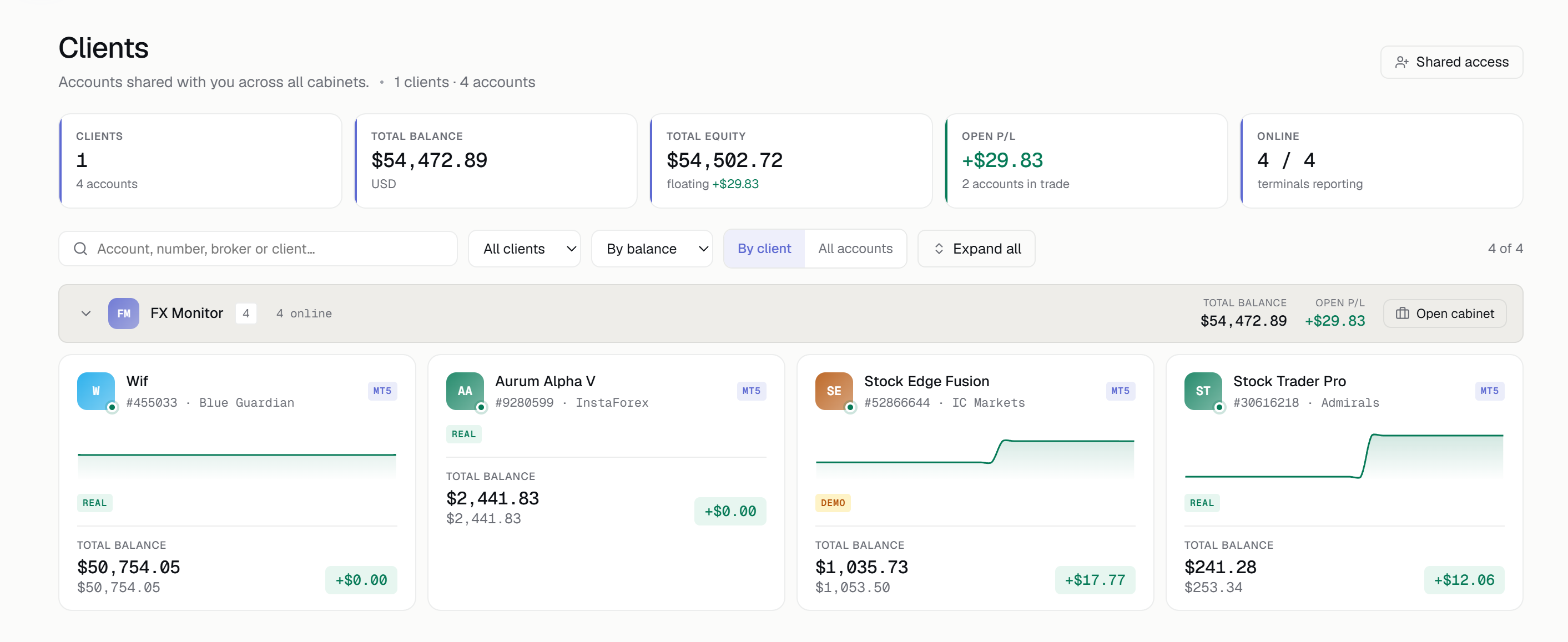
The invited person works under their own account. They switch between their own workspace and their clients' through a menu, with the current workspace always shown at the top of the page. They connect their own Telegram and choose which of the client's accounts to receive notifications for, without affecting the client's own settings. Those managing several clients get a dedicated Manager Workspace page: account cards grouped by client, total capital, balance charts, search and one-click drill-down into any account.
Certain things are never shared, regardless of permissions: billing and payment details, the workspace's main API key, profile settings, privacy settings, the right to invite third parties, and support tickets. Data deletion is a separate permission and is off by default even for a Manager. Where a manager or an EA developer needs to connect a terminal to an account, the owner can issue a dedicated EA connection key — scope-limited to the opened accounts, unable to create new ones, and killed the moment the invitation is revoked.
On the security side: the invitation link is single-use and personal, valid for 14 days and useless if forwarded to another address. Revocation takes effect immediately, from the invited person's very next action. Permissions are verified on every action rather than once at login. The activity log records not only what was changed but also attempts to do things the permissions didn't cover. If a subscription lapses, invitations go dormant rather than being deleted, and are restored with the same permissions when the plan returns.
Plans: inviting others into your workspace is available from the Starter plan and above. The Manager role — the right to make changes inside someone else's workspace — is available on the Vendor plan only. Viewing someone else's workspace is free and works on any plan, including the free one, so an investor, mentor or partner you grant access to doesn't need a subscription at all.
FX Monitor provides access to trading account analytics. The service does not execute trades, does not manage funds and does not constitute investment advice. Shared Access is available now for both MT4 and MT5.